Hold a vario in your hand on the ground and lift it. It starts to beep. Stop your hand at the top and wait. At some point it goes quiet, and the question this article is about is when exactly that point should be.
Ask three pilots and you get three answers. One wants silence the moment the lift stops, because by the time a vario has noticed, the core is already behind them. Another wants the tone to hang on a little, so a weak broken thermal does not chop itself into fragments. A third wants something almost all the time, because a soft tone in weak zero is how they find the next climb.
None of them is wrong. They want different things from the same few tenths of a metre per second around zero, and a vario has to be told which. Below is how a FlyBeeper vario makes that decision, which parts of it you can change, and what each change sounds like. Every chart in the article plays: press Play and you hear, beep for beep, what the vario does. Every one also has a link that opens the configurator with the same settings and starts its simulator, so you can drag the slider and listen for yourself.
From pressure to beep
The barometer is read every 16 ms. A filter turns the pressure into vertical speed, and then comes the first thing you can change: the vario averaging time. It is a plain exponential average, and the number you set is its time constant. Move from 0 to +2 m/s at once and after one averaging time the vario shows about 63 % of the step; after three it has all but arrived. The factory value is 0.1 s, the configurator accepts anything from 0.016 to 10 s.
What comes out of the averaging is the vario, in centimetres per second, and everything after it runs on a 40 ms loop. On every turn of the loop the vario also updates a second, slower average of itself, about 0.4 s long. That one is fixed, it does not appear in the settings, and its only job is to tell whether the climb is growing or fading. It comes back below, in the early exit.
The decision whether to sound is taken on that loop, but only between beeps. A beep that has started always plays to its end, and the length of each beep and of the pause after it is fixed at the moment it starts, from the tone curve at the vario of that moment. This matters more than it seems. In strong sink the factory curve plays 0.7 s beeps with 30 ms gaps, so the vario can only stop a sink tone at the end of a beep that may have started 0.7 s earlier. Climb beeps are shorter, a quarter of a second or less, so the climb side reacts in quarter-second steps.
What the tone is made of
The tone curve is twelve points. Each gives a vario value and three things for it: the pitch, the period from one beep to the next and the duty, the share of the period the beep sounds. Between the points the vario interpolates in a straight line. The curve is all there is to the character of the sound; the decision whether to sound at all is a separate step, and the rest of this article is about that step. Here is the factory curve around zero.
Three regions are easy to hear. Below about −1 m/s the factory curve plays a long low tone at 360–390 Hz, beeps of 0.7 s with gaps of a few tens of milliseconds: that is the sink tone. Above +0.4 m/s the pitch climbs from 470 Hz towards 2 kHz at +4.5 m/s while the beeps get shorter and faster: that is the climb tone everybody knows. Between them, from zero to +0.39, sits a third tone: a dry ticking at a flat 400 Hz, short at zero and dense just below +0.4, before the pitch jumps at +0.40. It is a near-zero tone, and its only purpose is to sound different from a climb.
Such a tone near zero is what is usually called a sniffer, and it is nothing more than a part of the curve. Whether you hear it depends on where the climb threshold sits. With the factory threshold at +0.05 you hear most of the ticking region; move the threshold below zero and the part of the curve under zero becomes audible too. It does not depend on where you came from: the same value gives the same tone on the way up and on the way down.
Two thresholds, and silence between them
The decision itself starts with two numbers. Above Start climbing the climb tone is on; below Start sinking the sink tone is on; in between the vario is silent. With the factory values, +0.05 and −2.50, the axis looks like this.
The silent band is wide on purpose. A paraglider in still air sinks at about 1 m/s and faster on bar, so the vario reads something between −1 and −2 for most of a glide. A sink tone there would never stop, and most pilots do not want to hear their own glide. What the band should contain is exactly where pilots differ, and the next two sections are the tools for shaping it.
A vario with memory
The first tool gives each side a second threshold. The climb tone starts above Start climbing, but once it is on, it holds until the vario drops to Climb tone holds down to. The sink tone starts below Start sinking and holds until the vario rises to Sink tone holds up to. Set a hold equal to its start and that side has no memory. A hold on the wrong side of its start is ignored.
That gives the vario a memory, and it is worth being exact about what it remembers. It is not “a tone is playing” but which tone is playing. A climb tone is held only by the climb hold and a sink tone only by the sink hold. A climb tone that fades past its hold stops, even where the sink hold would start; it does not turn into a held sink tone. Between the two holds the vario can be silent or sounding at the same reading, depending on how it got there. On the zone axis these are the hatched regions.
Here is the sink side. The pilot glides at −1, drops into −3.2 sink, then recovers slowly to −0.3, stays there for a few seconds and finds a climb.
And the same reading of −0.3 reached from above, after a climb:
The memory makes the band between the thresholds a matter of history: after sink, a tone; after climb, silence. That is the point of it near zero. In the glide range it can surprise you: with a sink tone that starts at −2.5 and holds up to −1.8, a glide on bar at −2.0 after a moment of −2.6 keeps the sink tone on the whole way, while the same −2.0 reached from above stays silent. The configurator shows a note when a sink tone has been held that way for a while.
Two ways to end a climb
The climb side is where pilots disagree most, and the vario offers two answers that pull in opposite directions.
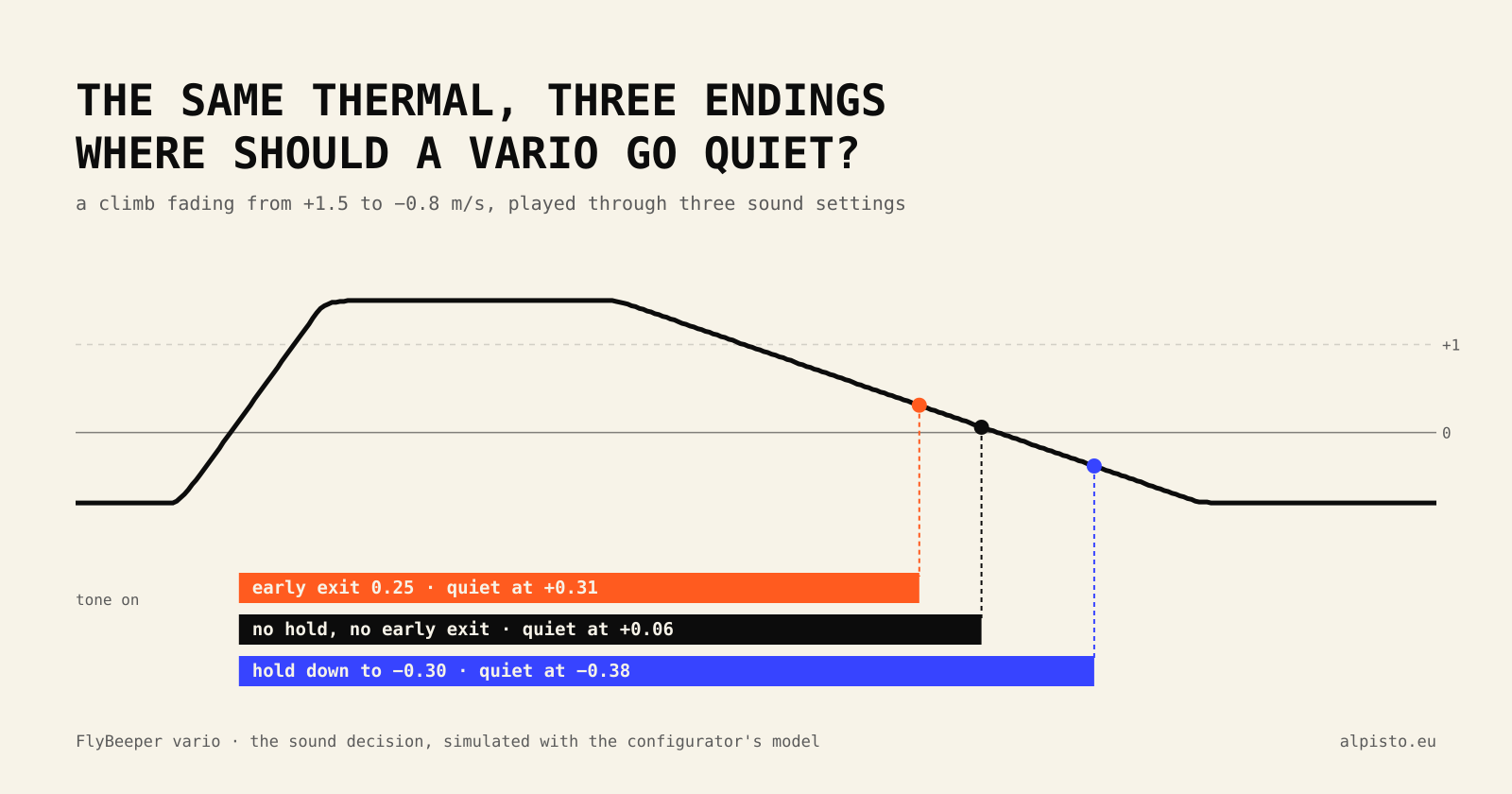
The first is the hold from the previous section. Once the climb tone is on it holds down to a value below Start climbing. A weak, broken thermal does not chop into fragments, and you keep hearing a core that is barely there.
The second is the early exit on a weakening climb, and it exists because of the delays described above. By the time the averaged vario has come down to Start climbing, the air has been weakening for a while, and the beep that is playing adds up to a quarter of a second more. The early exit compensates: while the climb is weakening, the climb threshold lifts by the early exit value, and the tone stops before the vario reaches Start climbing. The vario calls a climb weakening when its reading is below its own 0.4 s trend average and that average is still above Start climbing. As soon as the climb grows again, the reading is back above the trend average and the threshold drops back. An early exit of 0 switches it off.
The two cannot both act on a fading climb, because a fade is exactly when the early exit fires. With an early exit above zero the hold does not get a chance; with an early exit of 0 the hold works. The same thermal through three settings:
The ground test from the start of the article is the early exit at work. Lift the vario and stop: the reading falls below its trend average at once, the threshold jumps up, and the vario goes quiet while it still reads a few tenths of climb.
Averaging: calm against quick
The averaging time is the other knob that changes how a climb feels. Short averaging follows every bump of the air; long averaging smooths them out and reacts later. The same rough climb, averaged for 0.1 s and for 0.6 s:
The trend average for the early exit is taken from the vario after this averaging, so the two stack. With long averaging the vario is smooth, but it still falls below its trend average as soon as it starts to come down, so the early exit keeps working.
What other varios ship with
For a sense of scale, these are the factory defaults in the public manuals of five varios on the market. I leave out the names: the point is the numbers, not the brands.
| Climb tone from | Climb tone held to | Sink tone from | Tone near zero | Damping | |
|---|---|---|---|---|---|
| Vario A | +0.20 | +0.10 | −3.0 | none by default; a negative climb threshold makes one | 0 on a 0–10 scale |
| Vario B | +0.10 | — | −2.0 | from 0.3 below the climb threshold | 6 on a unitless scale |
| Vario C | +0.10 | — | −2.5 | from 0.5 below the climb threshold, on glide | 10 of 20, self-adjusting |
| Vario D | about +0.15 | — | about −1.5 | from −0.2 to +0.1 | not given |
| Vario E | +0.20 | +0.05 | — | from 0.4 below the climb threshold | a filter noise setting |
Two things stand out. Nearly everyone starts the climb tone between 0 and +0.2 and puts the sink tone between −1.5 and −3. And nearly everyone offers some tone near zero, below the climb threshold, which is the sniffer from the curve section under different names. None of them publishes its averaging in seconds; every manual uses its own scale.
Seven starting points
The configurator has seven combinations of these settings as presets, under When it sounds next to the sound settings. They do not change the tone curves. They are not recommendations: they are points spread over the space described above, so you can hear the combinations without typing six numbers. Each link below opens the configurator, applies the preset to your settings once you confirm, and starts the simulator’s demo.
What a new device ships with. Climb tone above +0.05, sink tone below −2.50, early exit 0.25, the shortest averaging.
Least delay: the tone stops the moment the climb weakens, well before zero. Sink tone from −2.00.
A climb tone that holds down to −0.20 once it has started, no early exit, a little more averaging.
A climb tone from +0.30 that holds down to +0.10, a sink tone from −3.00 that holds up to −2.50, longer averaging.
The climb tone starts at −0.30, so the curve’s own tone near zero is heard. No memory: the same whichever way you come.
Climb tone from 0, sink tone from −0.60, both held to −0.30. Silent only on the way from one to the other.
Climb tone from +0.30, sink tone only below −4.00, a short early exit.
Try it in the configurator
All of it is in the Sound page of the configurator, and none of it needs a device. The curve chart shows the zones of the axis behind the curve; the lines of the four thresholds can be dragged on the chart, and each zone explains itself when you point at it. Under the curve is the simulator: a slider for the vario, zoom of 2× and 10× for the region around zero, and a Demo button that plays a climb from −3 to +1 and back. Under the simulator, a chart of the last 20 seconds draws the same lines as the players in this article: the slider, the averaged vario, the trend average, the climb threshold in effect and where the tone was on. The settings on the right each have a question mark with a longer explanation.
The links in this article carry the settings in the address itself, after the #, so nothing is sent anywhere. The configurator shows what the link would change and applies it only when you press Apply; links from this page also start the demo, so you hear the result straight away.
If you would rather not pick numbers at all, Find your vario sound asks a few questions by ear and plays every answer before you choose it. At the end you get the tone table, the thresholds and a link that puts the sound on a FlyBeeper.
The rules in full
For anyone who wants to check the logic or reproduce it, this is the whole decision, taken on the 40 ms loop whenever no beep is playing. Values are in cm/s.
weakening  = early_exit > 0
             and vario < trend_avg
             and trend_avg > climb_on

climb_th   = climb_on + early_exit   if weakening else climb_on
climb_hold = climb_on + early_exit   if weakening else climb_off

if   vario > climb_th:                         tone = climb
elif vario < sink_on:                          tone = sink
elif tone == climb and vario > climb_hold:     tone = climb      # held
elif tone == sink  and vario < sink_off:       tone = sink       # held
else:                                          tone = none

trend_avg  : x = x * 9/10 + vario every 40 ms, trend_avg = x / 10   (about 0.4 s)
vario      : exponential average of the filtered reading, time constant = averaging time
A hold on the wrong side of its start counts as no hold, and the sink hold never reaches above the climb hold. When the tone is on, the beep length and the pause come from the tone curve at the vario of the moment each one starts.