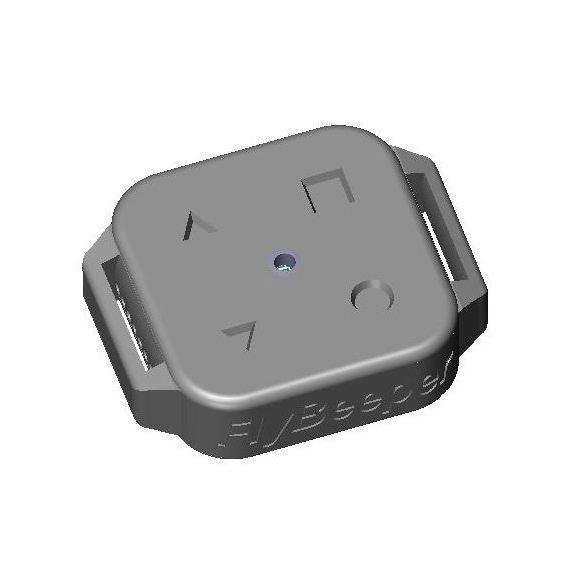
A dwarf-sized variometer based on a barometric sensor and a piezoceramic buzzer, with the ability to expose itself to a smartphone over Bluetooth LE as a pressure / temperature / barometric-altitude sensor — and also as a four-button remote control. Available in the store. It will be of interest to paraglider and hang-glider pilots, and even glider pilots. It turns any smartphone into a flight instrument.
Hardware overview
- Barometric sensor (
SPL06,DPS310orBMP280) on 8 MHz SPI, sampled 60 times per second. BLE notifications run inside the standard service0x181A Environmental Sensing: temperature (0x2A6E) at 0.2 Hz, pressure (0x2A6D) at 10 Hz, derived altitude (0x2A6C) at 1 Hz. Per-characteristic rate control via subscription is planned, up to 20 Hz. Pressure is also exposed via the Nordic UART Service in NMEAPRSorPOVform — kept for compatibility with older flight apps. In actual flight there is no difference between the supported sensors. Only on the ground is it noticeable that the newer SPL06 is less noisy (it is the default since version 1.6). - Four buttons on GPIO interrupts, exposed over BLE via a dedicated GATT service. They can drive a phone app, for example to navigate the map. I use service
0x1815 Automation IO Servicewith characteristic0x2A56 Digital, sending a single byte as a bitmask of button states. There is also a full HID-keyboard interface for xcTrack. - Low-power piezo buzzer with a dedicated volume-control IC. Frequency is driven by the MCU via PWM; volume is set through GPIO. Three volume levels, the same as in the mini2, plus a silent mode. The piezo is the dominant consumer of battery energy. Volume strongly affects battery life: a 2× ratio between levels 1 and 3, and a 3× ratio between silent (0) and max (3).
- Over-the-air configuration through a web app. Frequency, period and duty cycle at 12 vario breakpoints are user-configurable, as are the climb/sink trigger thresholds. On-device simulation is also supported. A graphical curve editor is planned for faster, more visual tuning.
- “Silent on the ground” mode. The vario only starts beeping after the altitude has shifted by roughly 1.5 m from the value at power-on. Disabled by default.
- LED rate proportional to vario. The faster the climb, the faster the LED blinks — a visual climb indicator. Disabled by default.
- CR2032 battery. Works at low temperatures where lithium-ion cells freeze. Average current with an active BLE link is 1.3 mA, which suggests 120+ hours at medium volume. With the SPL06 sensor (from version 1.6 onward) current drops to 0.8 mA with active BLE and 0.6 mA when idle, so in silent mode acting purely as an external BLE pressure sensor the device should run for up to 250 hours from a standard 210 mAh cell.
- Battery monitoring via SAADC for CR2032 (or a regular ADC with a resistor divider for future Li-ion projects). Battery level is published in
0x180F Battery Serviceas a percentage. - BLE 5 — the most energy-efficient way to move bytes per joule. The transmitter uses the minimum power necessary, dynamically adapting to range. High bitrate, small packets, scheduled bursts, and sleep between packets.
- OTA firmware updates as a side-effect of the BLE stack (see below).
PCB
The board is 25 × 25 mm. Including the battery, the full stack is under 8 mm thick.
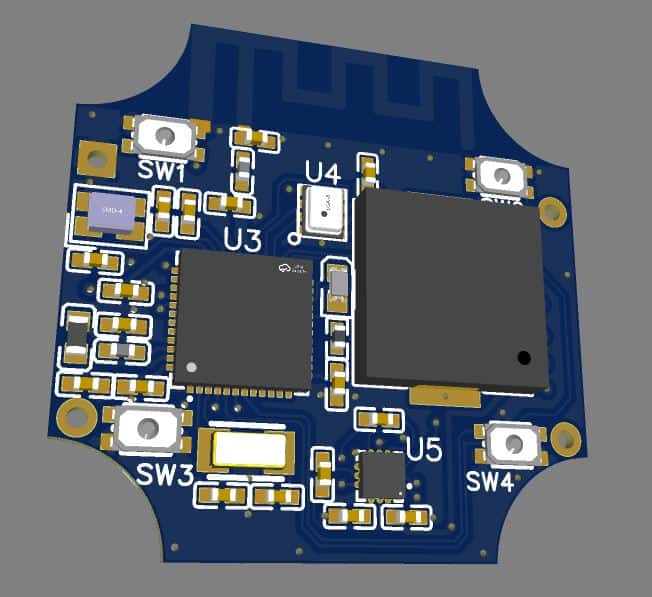 PCB top side with the SPL06 barometer, piezo and battery holder.
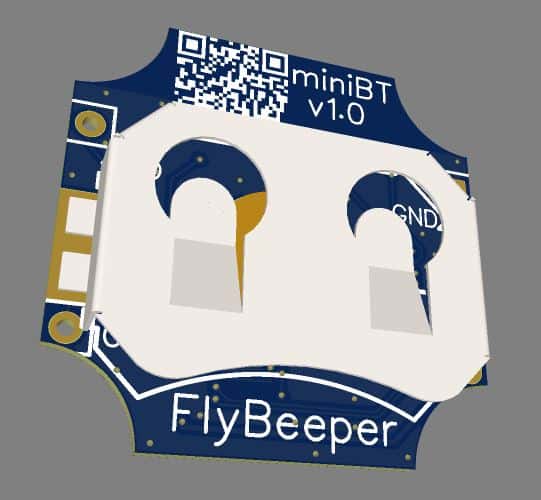 PCB bottom side.
Enclosure
Four buttons in the corners of the front face, with an LED indicator hole in the middle. The back has a removable cover with the battery holder underneath. On the side, a 13 mm slot accepts a hook-and-loop strap or a safety lanyard.
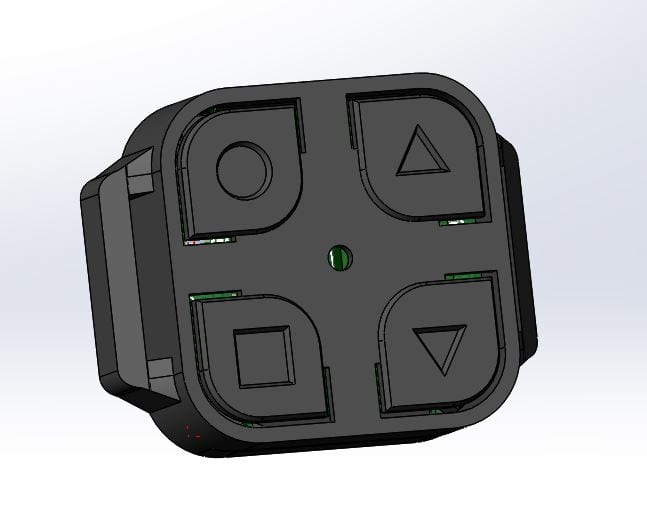 Enclosure front face: four corner buttons and a central LED hole.
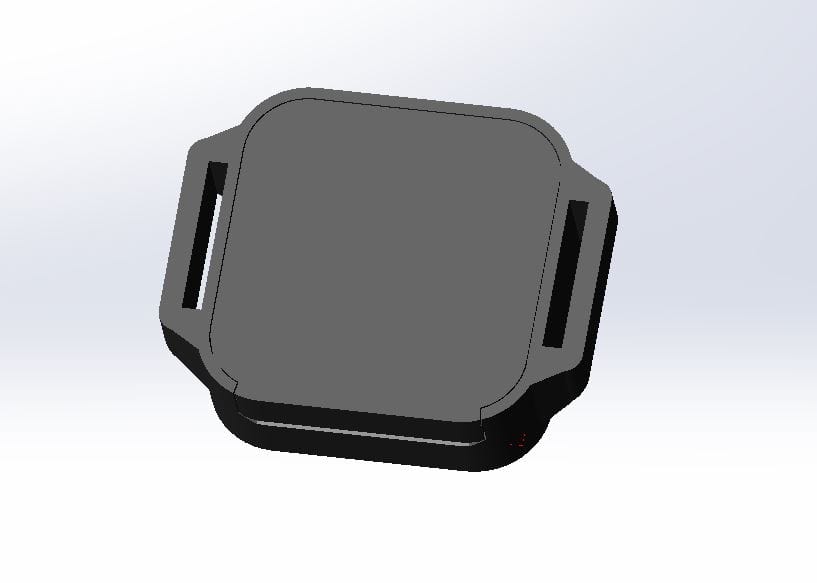 Enclosure back: removable cover and CR2032 holder underneath.
Test flights with the device mounted on the risers showed that button cut-outs on the front affected the pressure sensor. A test print in soft nylon without button cut-outs solved it. The buttons still work through the wall, and flow simulation confirmed better pressure stability when the device is blown by 10 m/s wind along or across the body. More simulations are needed to optimise behaviour under wind from arbitrary angles.
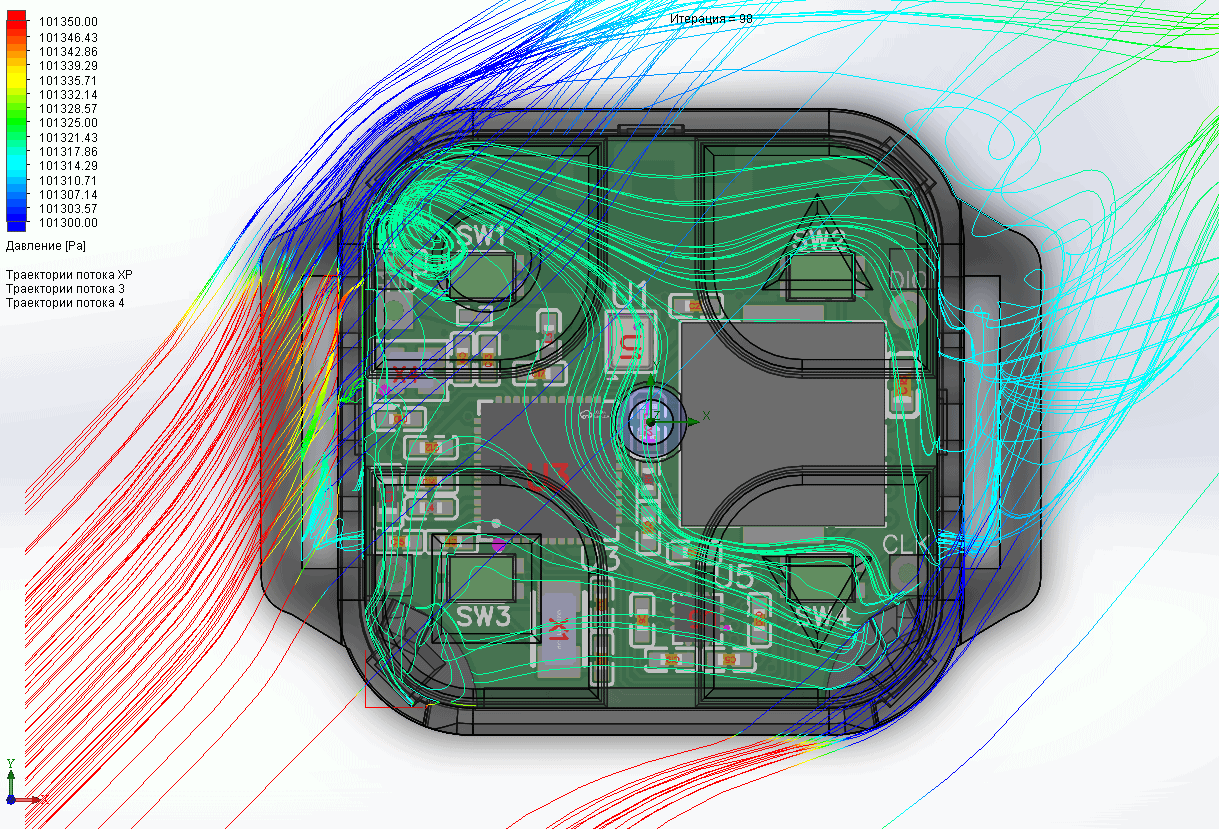 Flow simulation of pressure stability under 10 m/s wind along the body.
Bluetooth
A defining choice in this project is to expose all data via standard GATT services — no UART tunneling. The catch in 2023 is that not many flight apps support BLE this way yet. My own maps.flybeeper.com does: barometric altitude and button input both work. With 20 Hz pressure updates over BLE, you can compute climb rate accurately enough to drive the buzzer from the phone with no perceptible lag.
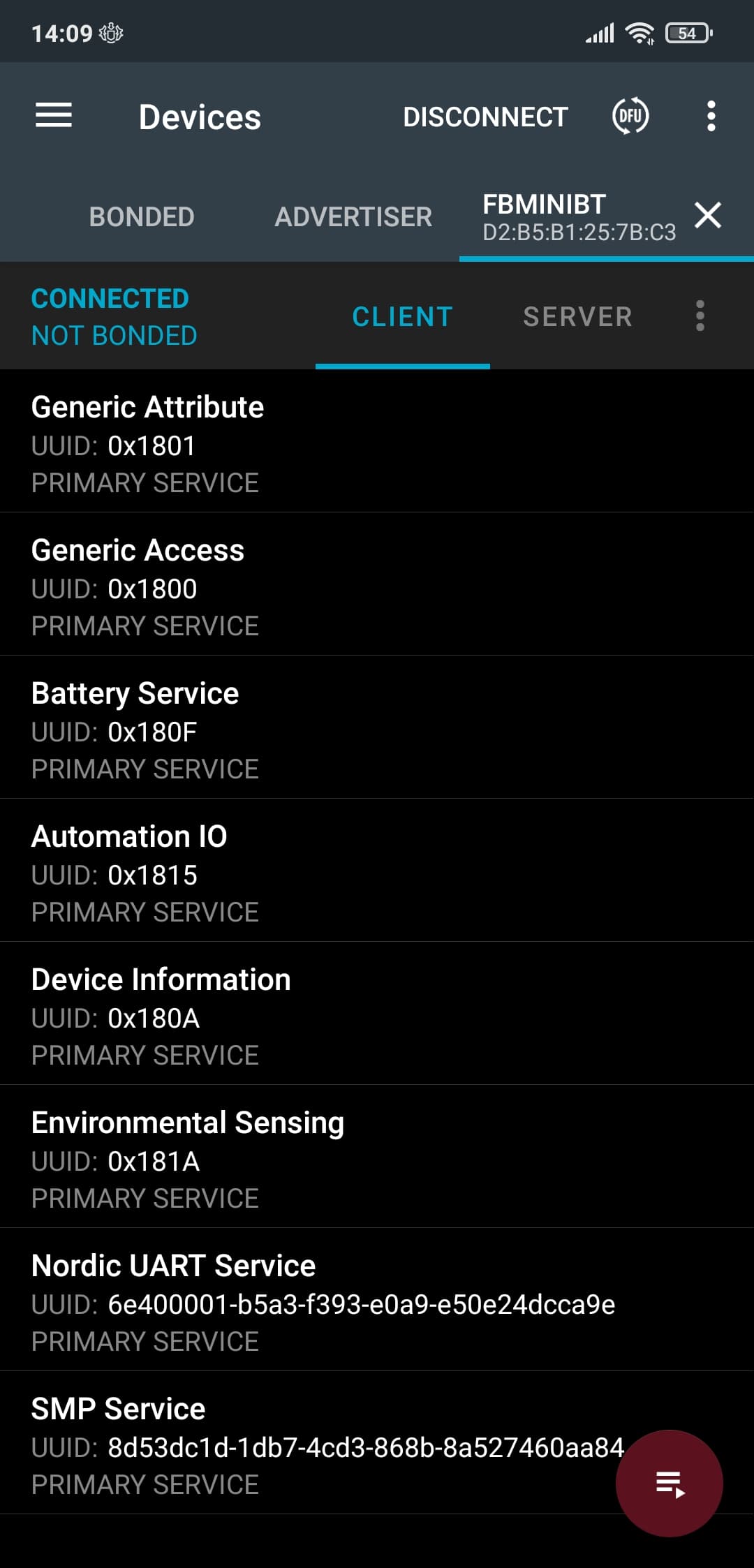 Standard 0x181A Environmental Sensing service exposed by the device (nRF Connect, Russian UI).
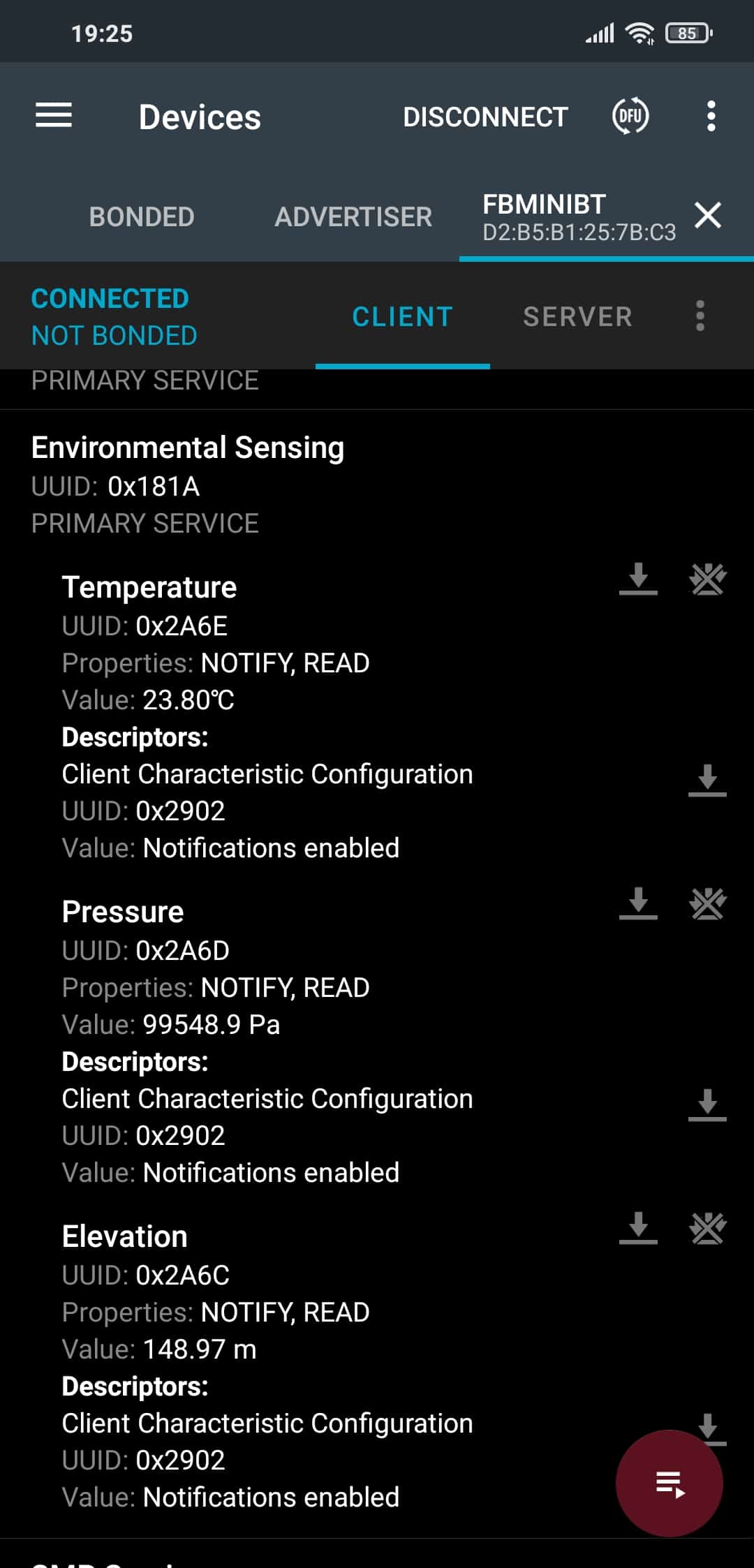 Live pressure notifications from characteristic 0x2A6D (Russian UI).
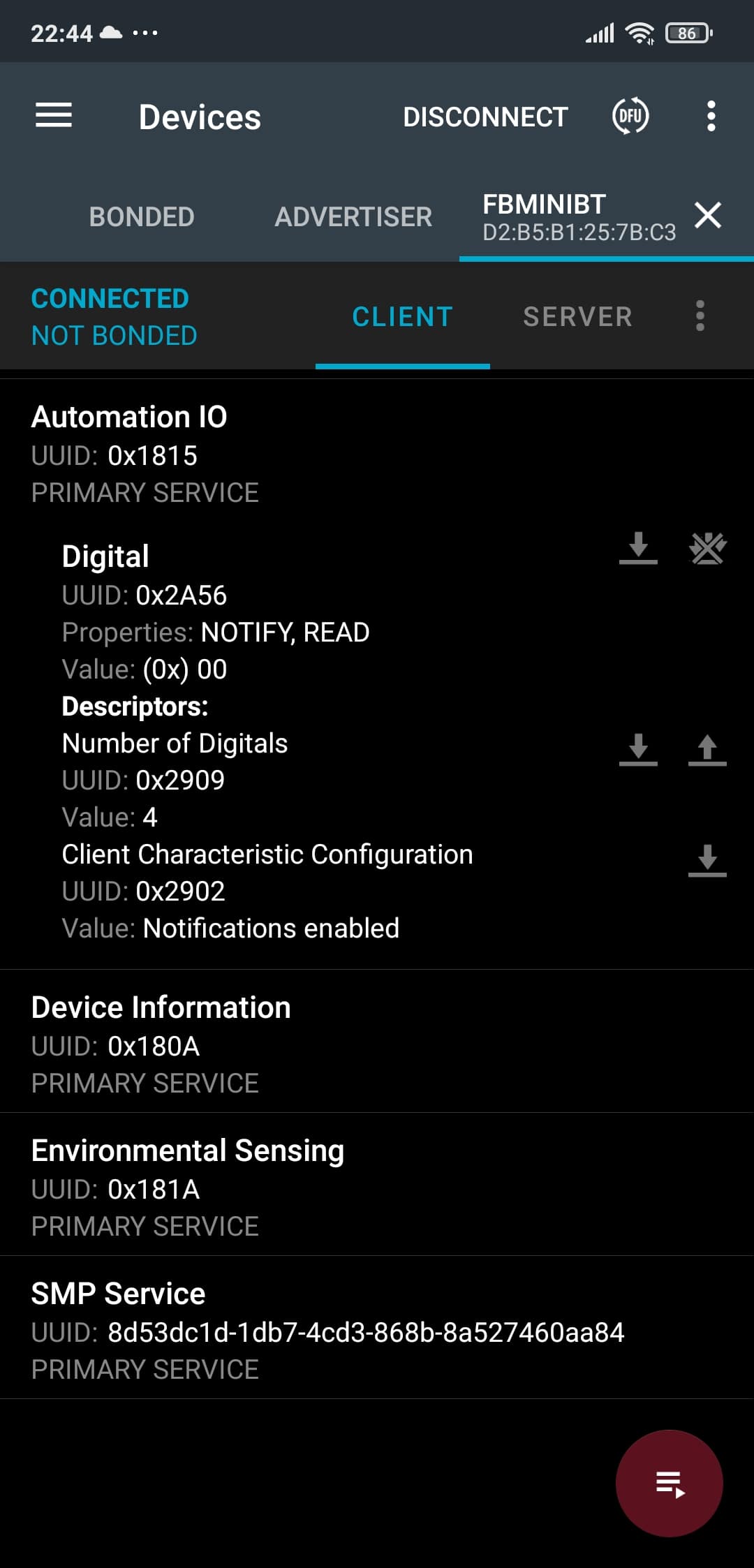 Button events via 0x1815 Automation IO Service (Russian UI).
A UART/COM/Serial emulation is also available via the Nordic UART Service and a text PRS protocol. But I would prefer the community to move forward and stop clinging to the 1969-era serial-port metaphor. Emulation steals channel bandwidth and burns compute cycles on both ends. I hope to convince fellow flight-software developers to support the actual BLE standards.
An audio sample is available.
Software support
- 2024-08-02 — LK8000 v7.4.19+ — pressure sensor (ESS)
- 2024-05-29 — xcTrack v0.9.11.10+ — pressure sensor (ESS) and battery
- 2024-05-20 — SeeYou Navigator v3.0.6+ — pressure sensor (ESS) and battery
- 2024-04-08 — Flyskyhy v8.2+ — pressure sensor (ESS), battery and volume control
- 2023-12-12 — xcTrack beta — pressure sensor (ESS)
- 2023-09-28 — xcTrack — buttons (HID)
- 2023-09-23 — FlyMe — pressure sensor
- 2023-08-29 — xcTrack, SeeYou and others — pressure sensor via text PRS protocol (UART)
- 2023-08-28 — maps.flybeeper.com — buttons (AIO)
- 2023-08-16 — maps.flybeeper.com — pressure sensor (ESS)
- 2023-08-14 — xcTrack commits to pressure-sensor support (ESS)
- 2023-08-01 — SeeYou Navigator expresses interest, including buttons
If your favourite flight app is missing from the list, leave a comment and I will try to reach the developers. If you are a developer, see the section below.
Firmware updates
OTA updates use the SMP Service. A web-app implementation is hopefully coming; meanwhile the best option is the popular nRF Connect for Mobile app. Install it, open the Scan tab, find the device named FBminiBT and tap connect. On the new tab, next to disconnect, tap the DFU icon. Pick the previously-downloaded firmware file app_update.bin. Choose Test and Confirm or Confirm only and tap Ok. After ~15 seconds the file is transferred, verified and the device reboots. The latest firmware is hosted on the configurator site.
History
The project started back in 2017. The original idea was to take the venerable ATmega-based vario-buzzer design and re-implement it on a Bluetooth-capable MCU. I picked the nRF52 and bought a development kit. Back then you had to code in SEGGER Embedded Studio, and the Bluetooth library was a blob of static code you linked against your own. I never figured out how to put the MCU to sleep and wake it every 16 ms to read the barometer while keeping Bluetooth alive. The project sat dormant until 2023, when I noticed Zephyr RTOS gaining traction. Nordic officially supports it and pushes it as a replacement for SEGGER and Keil. Five years on, they had done their homework, and even ported the chip to the Arduino platform. But it is Zephyr that unlocks the MCU’s full potential — and it solves the original problem: BLE + sleep + hard real-time barometric reads, simultaneously.
Running an RTOS on a microcontroller is a strange feeling. Preemptive multitasking, threads, tasks, mutexes and semaphores, a data bus, drivers. A Linux-style kernel config and a modular tree. Everything you would expect on a real computer. And yet the entire stack — GPIO, SPI, PWM, ADC, FLASH, OTA, DFU, BLE, GATT — plus the OS itself fits inside 200 kB.
On instant-response variometers
I have been flying paragliders since 2014. About 100 hours per year, mostly in the Alps. Waving an “instant” vario around on the ground is genuinely entertaining — there is a wow effect. In the air, those 1 cm/s readings are useless. Worse, given turbulence and the perfectly normal motion of a paraglider in an unstable atmosphere (in a stable atmosphere we only descend), a minimum amount of smoothing is essential, which means latency.
The point is the balance. Latency should stay under one second. At useful working rates of 1–2 m/s the latency should be lower than that; my variometers stay around 0.5 s. The most important latency is the climb-end latency. One second past the edge of a thermal at 36 km/h (10 m/s) takes you 10 m past the boundary; five seconds of latency take you 50 m past — about the radius of my circling spiral. Many simple variometers, especially software ones, run with 5 s of climb-end latency; phone-internal barometers are often low-sensitivity and sampled at 5 Hz. Newer ones go up to 25 Hz, but the push for water resistance hurts sensitivity.
So: oscillations around 0 m/s must be smoothed in real conditions, and at 1 m/s and above there is no real benefit to “instant” systems beyond a slightly shorter climb-end phase. Meanwhile you have added a new energy and compute consumer — the IMU. It has to be sampled far more frequently. The MCU sleeps less and consumes more. Computation goes up by an order of magnitude. None of this matters in a large instrument with a display, but for a tiny buzzer the IMU forces a switch to rechargeable batteries and multiplies complexity, which reduces reliability and inflates the price. The result is twice as expensive and bigger. There is nothing stopping a phone app from doing this in software using the phone’s own IMU, and such apps already exist.
Why no rechargeable Li-ion
Granted, swappable batteries are a hassle. They die at the worst possible moment. But they have advantages.
The biggest is temperature range. Lithium primary cells (not to be confused with Li-ion rechargeables) work at -15 °C outside and +40 °C in the sun. A compact instrument is meant to be mounted on the risers where it is well-cooled by airflow. Li-ion cells at near-zero temperatures stop delivering current, the voltage collapses, and the protection circuit cuts off. Coin cells have no protection — their discharge curve just shifts down and current capability drops, so you may need to lower the volume, and the device may report low battery (unless it has temperature compensation) but it will keep working. Their voltage only drops to 2 V at full discharge, regardless of temperature, and the MCU’s minimum is 1.7 V.
Board space. A charging connector takes real estate. A decent, rugged connector takes a lot of real estate. Then add the charge-control IC and its passives, the battery contacts, the BMS and an LDO or buck-boost regulator to stabilise 3.3 V.
Reliability. Li-ion cells swell, especially if overheated in the sun. Even if the case stays intact, the device has to go back for a battery swap.
Price and availability. A CR2032 is in every corner shop and gas station for about €1.
Safety. Some countries restrict transporting devices with Li-ion cells. We have all seen them burn. A CR2032 cannot really heat up on a short circuit, because it is sized for high-impedance, low-power loads — exactly like this vario at 1.3 mA.
Lifecycle. For an average pilot — 100 h/year, like me — it is enough to swap the cell at the start of every season, no matter how much is left in the old one. I always carry one spare in the cockpit, for defects or unexpectedly long flying sessions.
Energy efficiency. No intermediate regulators or protection circuits — direct supply from the cell reduces losses both in active and sleep modes.
Reliability, again. Fewer parts means fewer failure modes.
Why no solar panel
Granted, the idea of not worrying about power at all is attractive. Even though this vario is nominally a backup, I use it as my primary and replace the cell once a year. But what about adding solar?
Problem 1 — energy reservoir. Solar input must be buffered. Options: supercapacitor or battery. A supercap is appealing, but until it is charged nothing works. It has a high self-discharge rate, and the voltage is linear, so the circuit won’t run until you reach ~50%. You arrive at take-off, unpack your gear, and find the device dead — and you have to wait while it warms up to working voltage. Tucked back in a backpack, it will discharge reliably. There is a sweet spot here, and it is worth experimenting with supercap size and panel area. Average current is 1.3 mA, but in transmit bursts or when the buzzer beeps the device pulls 15 mA briefly. That demands a buffer. A battery, again, demands the support circuitry above.
Problem 2 — size. Going with a battery, you need 4.2 V + the diode drop for reverse-current protection + headroom for the charge controller. Solar panels are typically specified for 5.5 V peak. Looking for one, you find that the smallest mass-market size starts at 50 × 30 mm — and is usually 60 × 40 mm. Anything smaller is a custom order with a custom price tag. As a reminder, the device PCB is 25 × 25 mm.
Why no injection-moulded plastic enclosure
Counterintuitively, the enclosure takes more design time than the PCB. There are dozens of tiny features: cut-outs, snaps, slots, chamfers. Injection-mould optimisation and 3D-print optimisation are different, and (in my opinion) injection moulding is more constrained. Tooling for moulding costs around $1,000. After that, per-part cost is genuinely cheap. At my production volume I am more likely to ship a new model than to recoup the tooling cost.
The alternative — using an off-the-shelf USB-stick or power-bank enclosure — looks like an accessory rather than an instrument, and the form factor mismatches the function. The design becomes a hunt for the right case rather than the other way around.
3D printing lets me iterate freely and incorporate improvements quickly. Print quality keeps improving and prices keep falling. The sweet spot for me right now is SLS nylon powder.
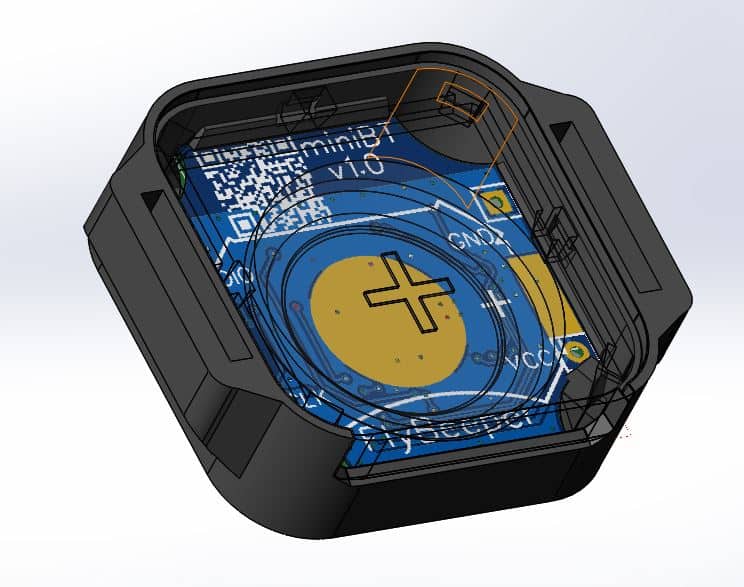 Cross-section of the SLS nylon enclosure — internal cavity around the buzzer and the battery.
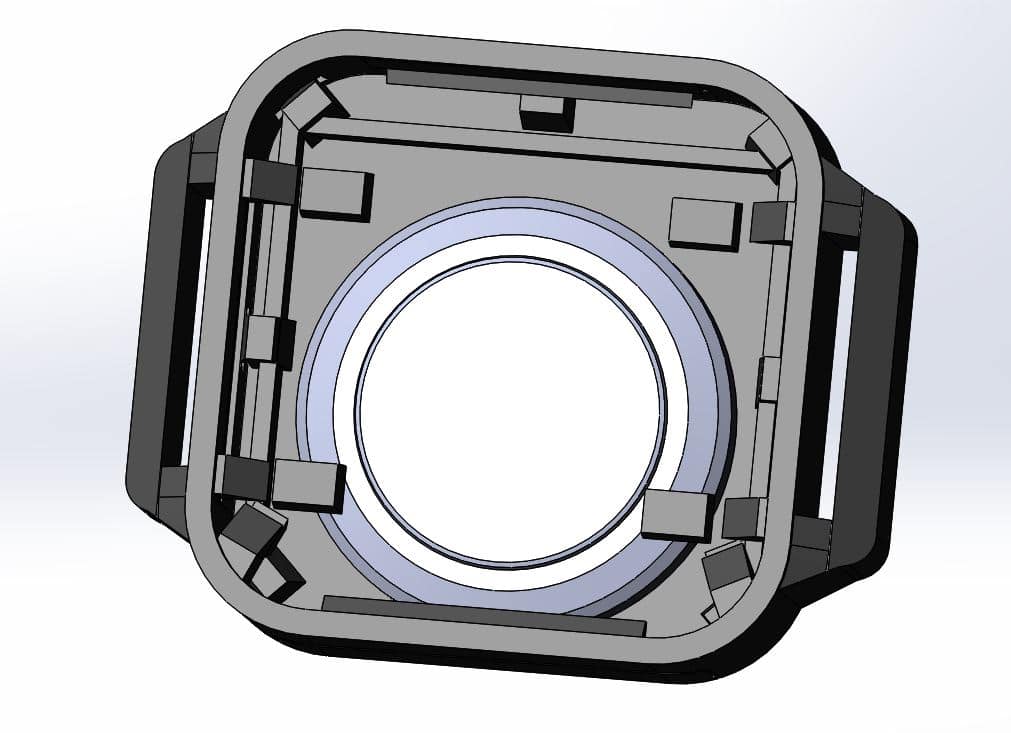 Comparison of a hypothetical injection-moulded shell against the SLS-printed alternative.
For developers
BLE
The standard 0x181A Environmental Sensing service is used, with pressure characteristic 0x2A6D. Notification rate by subscription is 10 Hz. You can sanity-check the device from Chrome’s Web Bluetooth demo. With Bluetooth on, hit start notification, and you should see my FBminiBT in the device list. After connecting, the Live Output should look like this (real device output below):
Requesting Bluetooth Device...
Connecting to GATT Server...
Getting Service...
Getting Characteristic...
> Notifications started
> 0x2e 0x3b 0x0f 0x00
> 0x27 0x3b 0x0f 0x00
> 0x26 0x3b 0x0f 0x00
> 0x25 0x3b 0x0f 0x00
> 0x25 0x3b 0x0f 0x00
These are pressure packets, uint32_t little-endian. To get Pascals: Pa = value.getUint32(0) / 10. The last row: 0x25 0x3b 0x0f 0x00 = 0x0f3b25 / 10 = 99818.1 Pa.
The device also exposes pressure over the classical UART/COM/Serial emulation.
The service used is the Nordic UART Service (6e400001-b5a3-f393-e0a9-e50e24dcca9e) with characteristic 6e400003-b5a3-f393-e0a9-e50e24dcca9e. Subscribing to it enables text-format pressure transmission. The default protocol is PRS:
PRS XXXXX\nXXXXX is the pressure in Pa, in hex: 101325 Pa = 18BCDh → PRS 18BCD\n. The POV format is also supported and switchable in the configurator.
Important: if an external app subscribes to pressure characteristic 0x2A6D in the Environmental Sensing service, text-format pressure over the Nordic UART Service is disabled to avoid duplicate data.
Simulation
If you do not have an FBminiBT yet, you can emulate one for app development using nRF Connect on a smartphone. In the Advertiser tab, create a packet and enable it without a limit. You can then connect to this phone from another device — Chrome Web Bluetooth, a second nRF Connect in Scan mode, or your own app. Once a connection is established, the Server tab on the first phone lets you send test packets. nRF Connect will not send notifications on a timer the way FBminiBT does — you have to send them manually. When sending a value, choose UINT32 (LE) and a decimal value such as 998181. The app encodes the right byte sequence for you.
Buttons
Buttons use service 0x1815 Automation IO Service with characteristic 0x2A56 Digital Input, readable and supporting notifications. It returns a single UINT8 byte, representing a two-bit-per-button array (little-endian). Every two bits encode one button’s state, starting from the least significant bits. 0b00000001 means button 1 is pressed. The device has 4 buttons, defined in descriptor 0x2909 Number of Digitals. So pressing all four simultaneously returns 0b01010101. See the Automation IO Service 1.0 Specification §3.1.1 for the full state semantics. I only use 0b00 (released) and 0b01 (pressed). Notifications fire on state change, separately for press and release. This makes it possible to detect long-press, double-click and multi-key chords. When an external app subscribes to button notifications, the device disables its own internal button functions (such as volume control), so they don’t fight.
The first iteration used a custom UUID for the buttons service and characteristic. Then I switched the characteristic to one from Nordic’s demo code, then to the Human Interface Device service — which turned out to be on the Web Bluetooth blocklist. Finally I switched to AIOS with the standard Digital characteristic. The whole BLE stack now uses standards-compliant identifiers.
In addition to AIOS there is a full HID-keyboard implementation. HID requires authenticated, encrypted pairing. During pairing, when prompted for a code, press the power button (the one with the circle); pressing the square button cancels. After pairing the buttons are usable in any Android or Windows application. By default the buttons map to F1–F4.
Battery
Standard 0x180F Battery Service with 0x2a19 Battery Level, returning percent. Temperature compensation is planned. For now, 50% maps to 2.78 V.
Settings
Settings live in service 904baf04-5814-11ee-8c99-0242ac120000. From hardware revision 0.16 onward, each setting is its own characteristic. Each meaningful characteristic has two descriptors: a User Format Descriptor with the setting’s name, and a Presentation Format Descriptor that describes how to interpret the value (see Bluetooth Core Specification [Vol 3] Part G §3.3.3.5). Below are examples showing that settings can be changed not only through the dedicated configurator but also from any general-purpose Bluetooth-standard tool.
I won’t enumerate all of them, but one special characteristic — 904baf04-5814-11ee-8c99-0242ac120002 — is for buzzer_simulate_vario_value. Writing an INT16 LE value of 0 disables simulation. Writing 100 turns on the vario tone corresponding to a 1.00 m/s climb.
Production notes
Programmer wiring:
P20 nRF52-DK           FBminiBT Board
VDD ------+-------------> VDD
         /
VTG ----+
GND ------------+-------> GND
SWD IO -----------------> SWD IO
SWD CLK ----------------> SWD CLK
Do not supply power separately to the target board — it gets power from the programmer. With VDD disconnected, the DK programs its own onboard chip; with VDD connected, it programs the external chip. Programming can be done via SEGGER J-Flash: create a new project, pick the target MCU, then Target → Connect and flash. Alternatively, use VS Code with the nRF Connect extension.
After the initial flash, every subsequent update can be done over the air via OTA. The required file is app_update.bin; the file and bootloader are protected by certificate, so a foreign image will not be accepted. To flash, install nRF Connect, scan, connect, switch to the device tab, hit DFU, pick the new firmware file. You should see a progress chart. After validation, the app prints Done. The whole process takes under a minute.